
VolumeShader_BM Test: Your Device's GPU Performance Benchmark
Volume Shader test is a free, browser-based GPU benchmark test that measures how well your device handles graphics-intensive tasks. Simply click 'Run Test' and watch as your device renders stunning 3D visualizations while we measure its performance in real-time.

No downloads or installations needed to run the test as everything runs directly in your browser using WebGL technology.
This is a perfect benchmark test for comparing devices, checking performance, or just seeing what your phone, tablet, or computer can do!
What is Volume Shader BM?
Volume Shader BM (aka. volumeshader_bm) is a GPU (Graphics Processing Unit) benchmark test that evaluates your device's graphical performance. It works by rendering complex 3D volume shaders and sophisticated visual effects that require significant processing power.
This test measures how smoothly your device can handle graphics, giving you real-time performance metrics like FPS (frames per second) and rendering stability.
Unlike traditional benchmark tools that require software installation, our Volume Shader Benchmark test runs entirely in your web browser using WebGL technology. This makes it accessible to everyone, regardless of their device type or technical expertise.
The test creates stunning 3D visualizations while simultaneously measuring your device's ability to render complex graphics in real-time.
How to Use It
Using Volume Shader BM is incredibly simple and takes just a few seconds.
The entire test runs in your browser, no app downloads, no installations, no account creation needed.
Here is how to run the test:
- Click the 'Run Test' button on this page (or use the button in the navigation)
- The test will automatically start in your browser, no waiting, no setup required
- Watch the mesmerizing 3D visualizations render on your screen in real-time
- View your device's performance metrics displayed on-screen (FPS, stability, etc.)
- Interact with the visualization using your mouse or touch gestures
What Do You Need?
To run the Volume Shader BM test, you only need:
- A device (smartphone, tablet, laptop, or desktop computer)
- A modern web browser (Chrome, Firefox, Safari, Edge, or Opera)
- WebGL support (enabled by default in most modern browsers)
- An internet connection (only needed to load the page initially)
What Makes This Test Different?
Volume Shader BM stands out from other benchmark tools in several important ways:
- Browser-Based: No software to install as everything runs in your web browser
- Instant Results: Get performance metrics in real-time as the test runs
- Visual Feedback: See beautiful 3D visualizations while testing, not just numbers
- Privacy-First: All processing happens on your device and your data never leaves your browser
- Cross-Platform: Works on Windows, Mac, Linux, iOS, Android or any device with a browser
- Free Forever: No cost, no subscriptions, no hidden fees
Best Practices for Accurate Results
To get the most accurate benchmark results, follow these tips:
- Close unnecessary apps and browser tabs before running the test
- Ensure your device is not in power-saving or battery saver mode
- Let your device cool down if it's been running hot
- Use a modern, updated browser for best performance
- Run the test multiple times and average the results for consistency
- Make sure your device is plugged in or has sufficient battery (for mobile devices)
- Disable browser extensions that might interfere with WebGL rendering
Why Everyone is Testing Their Devices
Volume Shader BM became a viral sensation on TikTok, Instagram, and other social media platforms when people started using it to test and compare their devices. Tech reviewers, influencers, and everyday users discovered it's a fun and easy way to see how their phones, tablets, and computers perform.
Here's what makes this benchmark test so popular and what you can discover about your device:
Check Your Device's True Performance
See how well your device handles graphics-intensive tasks. Perfect for verifying if your phone or computer is performing as expected, or identifying potential performance issues.
Compare Different Devices
Test multiple devices and compare their performance side-by-side. Great for deciding which device to buy, or just satisfying your curiosity about how different brands and models stack up.
Verify Device Authenticity
Many users have discovered that this test can help identify if a device is genuine or if it's been modified. Lower-than-expected performance might indicate a fake or refurbished device.
Real-Time Performance Metrics
Get instant feedback on FPS (frames per second), rendering stability, and lag detection. Watch your device's performance in real-time as the test runs.
No Installation Required
Everything runs in your browser so, no apps to download, no software to install. Just visit the website and start testing immediately.
Works on Any Device
Test smartphones, tablets, laptops, and desktop computers. As long as your device has a modern browser, you can run the benchmark test.
Benchmark Screenshots
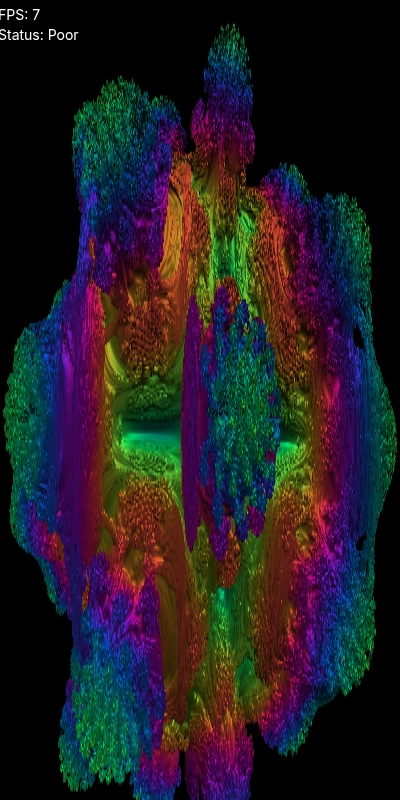
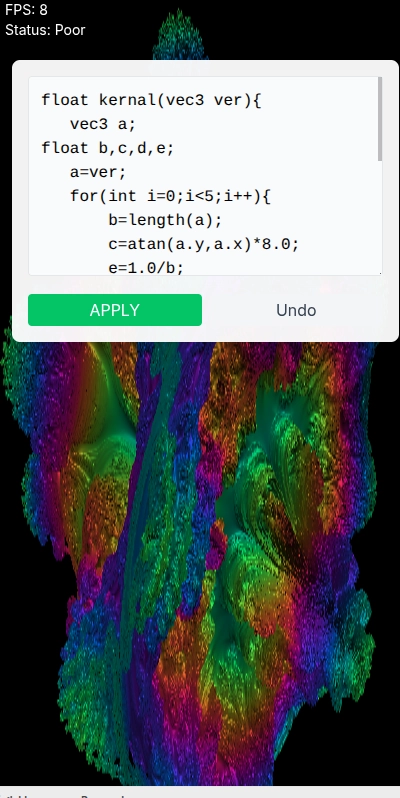
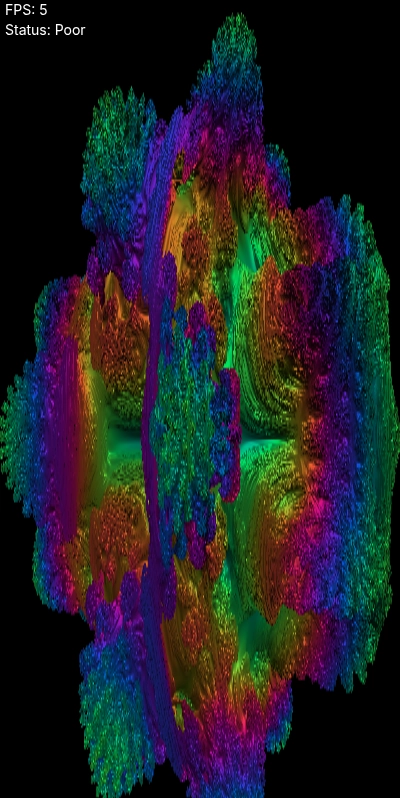
How It Works: The Technology Behind the Test
Our test uses WebGL (Web Graphics Library) technology to create complex 3D visualizations that stress-test your device's GPU. Here's how it works:
- WebGL Technology: Uses your browser's built-in graphics capabilities to render 3D graphics without any plugins or downloads. WebGL is a JavaScript API that provides hardware-accelerated 3D graphics rendering directly in web browsers.
- Volume Shader Rendering: Creates complex 3D volumetric effects using advanced shader algorithms. These shaders calculate how light interacts with 3D volumes, requiring significant GPU processing power and memory bandwidth.
- Real-Time Performance Monitoring: Tracks FPS (frames per second), frame times, rendering stability, and lag detection as the test runs. All metrics update in real-time, giving you instant feedback on your device's performance.
- Browser-Based Testing: Everything happens in your browser, ensuring privacy and security of your data never leaves your device. No server-side processing means complete privacy and faster results.
- Cross-Platform Compatibility: Works consistently across different devices, browsers, and operating systems. Whether you're on Windows, Mac, Linux, iOS, or Android, the test provides comparable results.
- GPU Stress Testing: The volume shader rendering pushes your GPU to its limits, providing an accurate assessment of how well your device handles graphics-intensive tasks like gaming, video editing, or 3D applications.
Who Can Use Volume Shader BM?
Volume Shader BM is useful for anyone who wants to understand their device's performance. Here are some common use cases:
- Smartphone Users: Test your phone's GPU performance, compare with other models, verify device authenticity, or check if your phone can handle demanding apps and games
- Gamers: Check if your device can handle graphics-intensive games, optimize your gaming setup, or compare gaming performance across different devices
- Tech Enthusiasts: Satisfy your curiosity about device performance, stay informed about hardware capabilities, or participate in the viral social media trend
- Developers: Test WebGL compatibility and performance across different devices and browsers, ensure your web applications work well on various hardware
- Shoppers: Compare device performance before making a purchase decision, verify that a device meets your performance requirements, or check if a used device is performing as expected
- Students & Educators: Learn about GPU performance, understand how graphics rendering works, or demonstrate device capabilities in educational settings
- Anyone Curious: Just want to see what your device can do? This test is for you too! No technical knowledge required so just click and discover.
Understanding Your Test Results
After running the Volume Shader BM test, you'll receive several key performance metrics. Here's what they mean and how to interpret them:
- FPS (Frames Per Second): This is the most important metric. Higher FPS means smoother graphics. 60+ FPS is excellent, 30-60 FPS is good, 15-30 FPS is moderate, and below 15 FPS indicates limited GPU performance.
- Frame Time: The time it takes to render each frame. Lower is better. Consistent frame times indicate stable performance, while variable frame times can cause stuttering or lag.
- Rendering Stability: Measures how consistent your device's performance is. Stable performance without drops is ideal for smooth graphics rendering.
- Visual Quality: The complexity and detail of the 3D visualizations your device can render. Higher quality rendering indicates better GPU capabilities.
- Lag Detection: Identifies performance drops and stuttering during graphics processing. Consistent performance without lag indicates a capable device.
- Real-Time Metrics: All metrics update in real-time as the test runs, giving you immediate feedback on your device's performance under load.
Common Use Cases and Scenarios
People use Volume Shader BM for various reasons. Here are some common scenarios where this benchmark test is particularly useful:
- Before Buying a Device: Test devices in-store or compare online reviews to make informed purchasing decisions
- Verifying Device Authenticity: Lower-than-expected performance might indicate a fake, refurbished, or modified device
- Troubleshooting Performance Issues: Identify if graphics problems are hardware-related or software-related
- Comparing Devices: Test multiple devices side-by-side to see which performs better
- Social Media Sharing: Join the viral trend by sharing your results on TikTok, Instagram, or other platforms
- Gaming Optimization: Check if your device can handle specific games before downloading or purchasing them
- Performance Monitoring: Track your device's performance over time to detect degradation or issues
- Educational Purposes: Learn about GPU performance, WebGL technology, and graphics rendering
What Makes Volume Shader BM Special?
Volume Shader BM stands out from other benchmark tools because it:
Runs entirely in your browser with no downloads or installations needed
Works on any device with a modern browser i.e. phones, tablets, laptops, and desktops
Provides real-time performance metrics as the test runs
Uses advanced 3D volume shader rendering to truly stress-test your GPU
Is completely free and accessible to everyone
Keeps your data private and all processing happens locally on your device
Makes it easy to share and compare results with others
Has become a viral social media trend, making device testing fun and engaging
Ready to Test Your Device?
Volume Shader BM is the easiest way to test your device's GPU performance. Whether you're curious about your device's capabilities, comparing different models, verifying authenticity, or just want to join the viral trend, this benchmark test gives you instant, accurate results.
The test is completely free, requires no installation, and works on any device with a modern browser. Just make sure you're using a modern browser with WebGL support (most browsers have this enabled by default). Chrome, Firefox, Safari, and Edge all work perfectly.
Important Note: The test is very resource-intensive and will push your device's GPU to its limits. This is intentional as it is designed to stress-test your hardware. If you have an older or lower-end device, it may run slowly or become temporarily unresponsive. This is normal and actually helps you understand your device's true performance limits. If your device becomes too hot or unresponsive, simply close the browser tab to stop the test.